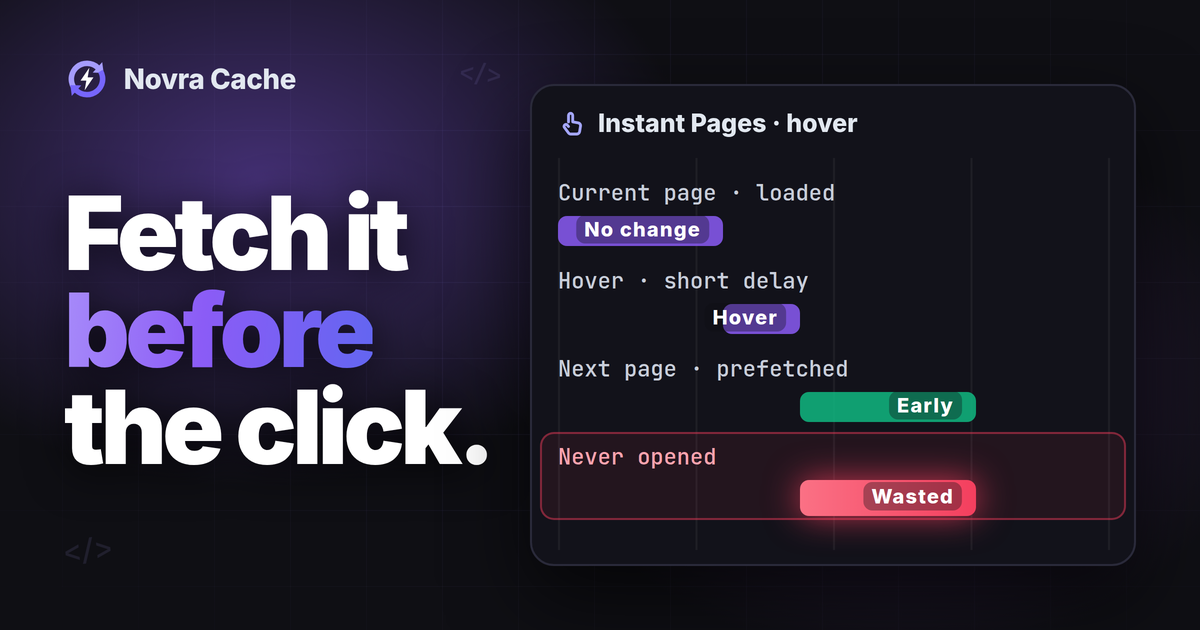
Link prefetching asks the browser to fetch a likely next page before you open it. It can shorten that next visit if the response is reusable. It does not speed up the page already on screen.
If you want WordPress to prefetch links, first identify anything already doing that job. Novra Cache’s Instant Pages feature provides hover timing, simultaneous-request limits and URL exclusions. Those controls can help you manage anticipatory loading. Check them first on staging, a separate test copy of your site. Keep WordPress’s existing solution if it already meets your needs.
Decide whether the extra requests are worthwhile
Prefetching trades work now for potentially less waiting later. The browser may download a destination that nobody opens. That can consume bandwidth and create server work, especially when the destination is not already cached.
- A useful candidate: a public guide with a clear next chapter and responses the browser can reuse.
- A weaker candidate: a crowded directory where visitors inspect many links but open very few.
- Start with exclusions: shops, member areas and personalized routes need careful handling before anticipating navigation.
- Fix the underlying delay first: speculative requests cannot replace reliable page caching or resolve an overloaded backend.
Benefits depend on the time before the click, browser behavior and the destination’s cache rules. A prefetched document can still need validation or another download. Its images, styles and scripts can also require network work during navigation.
Separate prefetching from other loading features
Several features use similar names but prepare different things. A resource hint is a suggestion to the browser, not a command it must follow.
| Mechanism | What it prepares | Important distinction |
|---|---|---|
| DNS prefetch or preconnect | A domain lookup or connection. | Neither downloads the next page’s HTML, its underlying structure. |
| Asset preload | An important resource for the current page. | It is not a way to prepare every destination link. |
| Link prefetch | A resource that a later navigation may need. | Novra’s inspected implementation requests destination documents with rel="prefetch". |
| Speculation Rules | Future documents selected through browser rules. | The rules can request either prefetching or prerendering. They are not Novra’s inspected link-prefetch mechanism. |
| Prerendering | A destination loaded and rendered ahead of navigation. | It can load subresources and execute JavaScript before the visitor opens the page. |
| Page-cache warmup | Server-side cached responses. | It is separate from a visitor’s browser preparing a next page. |
See MDN’s overview of speculative loading mechanisms for the browser-side differences. Our page cache versus object cache guide explains the server-side layers.
Fetching a document is not the same as executing its page scripts. However, the request still reaches a server or cache. It can appear in access logs, affect server-side measurement or involve cookies and personalized responses. A GET request can even trigger an action in some applications. Do not assume speculative requests are invisible or harmless.
Check what WordPress already provides
WordPress introduced built-in speculative loading in version 6.8. Its launch configuration used conservative document prefetching through Speculation Rules for eligible logged-out visits. Check your installed version and active configuration rather than assuming those defaults still describe your site.
The WordPress explanation of speculative loading describes its behavior and exclusions. These are different controls from Novra’s Instant Pages settings.
- Check WordPress, your theme, builder, host and performance plugins for existing prefetch or prerender features.
- Inspect the delivered page and request initiators to identify which mechanism actually runs.
- Choose one responsible mechanism for the navigation behavior you want. Avoid stacking features simply because their names differ.
If the existing setup works and its exclusions fit, keep it. You do not need another plugin just to add a second speculative request. Do not disable unrelated page caching, image optimization or other working features during this check.
Understand Novra Instant Pages controls
Novra Cache documents WordPress 6.2+, PHP 8.1+ and administrator access as requirements. PHP is WordPress’s server-side programming language. The behavior below comes from current documentation and static plugin-source inspection. It is not a test of your installed release or a measured speed improvement.
The inspected script creates rel="prefetch" links with as="document". It checks browser support before starting. Candidates must share the current page’s origin: the same scheme, host and port. Links to the current path and query are skipped.
MDN describes link prefetching and its browser limitations. Support is not universal, and cache headers can limit reuse. A browser may ignore or restrict speculative work even when your settings are enabled.
Start with a controlled trigger
The Instant Pages tab contains Enable Instant Pages, Preload Strategy, Hover Delay (ms) and Max Concurrent Requests. The documented default strategy is Hover, with a 65 ms delay and a concurrency setting of 3. These are defaults, not proven optimal values for your site.
- Hover: the inspected implementation waits for the configured delay. It also handles mouse press and touchstart.
- Viewport: it can consider visible links, as well as hover and press events. This can create work without a deliberate link choice.
- Mousedown: the settings value and desktop handler use different strategy names in the inspected source. Verify this mode in your installed release before relying on it.
Use Hover for the initial comparison described below. Touchstart is also registered by the inspected script, so desktop hover testing does not establish mobile behavior.
The concurrency setting limits outstanding speculative requests in that browser context. It is not a bytes-per-visit allowance or a guaranteed requests-per-second limit. Many visitors can still generate significant combined load.
Do not rely on Stop on Server Error as guaranteed overload protection. The inspected guard watches JavaScript fetch responses, not each link-prefetch response. Its presence does not prove that a failed prefetch stops subsequent speculative work.
Exclude actions and personalized destinations
Ignore Keywords uses literal, case-sensitive substring matching against destination URLs. It is not the page-cache exclusion list, a wildcard system or a regular-expression field. Keep existing protections when adding your own entries.
The source defaults contain /wp-admin/, logout, add-to-cart and #. They do not establish complete cart, checkout, account or query-string protection. A nonempty custom list replaces the script’s default list, so do not discard those entries accidentally.
Review actual login, checkout, receipt, membership and account paths, including translated or customized routes. Exclude action URLs and destinations whose output depends on a particular visitor. Do not assume page-cache exclusions automatically prevent link prefetching.
This is an illustrative starting list for a site using these paths, not a complete shop policy. Adapt it before use. The question mark deliberately excludes all query-string destinations. Use one entry per line.
/wp-admin/
logout
add-to-cart
#
/wp-login.php
/cart
/checkout
/account
/my-account
/receipt
?
These broad substrings can also exclude harmless URLs. Check the full destination, not just the link’s visible wording. Third-party destinations fail the inspected script’s same-origin check, but another optimization mechanism may have different rules.
The inspected script also recognizes data-no-instant on an individual link. A developer can use that when maintaining link markup. WordPress’s no-prefetch class belongs to its own rules; do not assume it also controls Novra’s script.
Set up one small staging comparison
The Novra Cache documentation for preload and Instant Pages locates the relevant controls. Keep server cache warming separate throughout this comparison.
- Record a baseline and restore path. Save the existing settings and identify the mechanism responsible for current speculative requests.
- Choose safe staging pages. Use a public information page linking to another public information page. Avoid accounts, forms, carts and action URLs.
- Review exclusions first. Preserve the supplied entries and add the real paths your site needs excluded.
- Change one mechanism. In Instant Pages, enable the feature and select Hover. Record the actual delay and concurrency values, then select Save Settings.
- Check the delivered page. Use your established staging workflow if cached HTML needs refreshing. Confirm the test uses the intended settings before measuring.
If another mechanism already provides the chosen behavior, evaluate that instead of enabling a duplicate. Where removing an overlap requires code or host changes, have its maintainer coordinate the change.
Measure the next navigation and wasted work
The following is a proposed test plan, not a benchmark we performed. For example, use two inert staging pages named /guide-a/ and /guide-b/.
Identify the request before the click
- Open browser developer tools before loading the starting page. In Chrome’s Network panel, select All and enable Preserve log.
- Record the browser, login state, connection conditions and starting cache state. Keep Disable cache unchecked when checking whether prefetch can be reused.
- With your baseline settings, observe the destination before opening its link. Record any existing speculative requests and their initiators.
- Repeat from an equivalent fresh starting state with the selected feature active. Hover over the safe destination without clicking, then inspect any request.
- Check the exact URL, initiator, start time, response status and transferred bytes. Look for
Sec-Purpose: prefetchwhere the browser exposes it. - Open that same safe destination. Check the navigation’s timing and cache result, including any validation or fresh network request.
Do not filter only for document navigations: a speculative request may appear under another resource type. Inspect its details rather than inferring behavior from the label alone. Chrome’s Network panel reference explains initiators, headers, preserved logs and cache controls.
Repeat the same short route under comparable conditions. Record total extra requests and bytes, including prefetched destinations you do not open. One quick navigation does not establish an overall improvement if it required substantial unused downloads.
Check exclusions and realistic browsing conditions
Use inert staging stand-ins for excluded URL patterns. They must not log anyone out, modify a cart or trigger external systems. Confirm no speculative request occurs for them, without opening real action URLs.
Pair each exclusion check with an eligible, harmless link that does prefetch. If nothing prefetches, you have not proved that exclusions work. The browser may have declined all speculative work.
Review desktop and touch devices separately. Compare normal and constrained connections, and inspect actual requests rather than assuming a browser emulation changes every device signal. The source checks some exposed data-saving and slow-connection signals. That is not universal coverage for all devices or settings.
Watch host load and errors alongside the browser results. Agree on a stop condition before expanding beyond staging. Keep the feature off if useful navigation gains do not justify the added work.
Do not claim faster first arrivals or better Google user-experience metrics from this experiment alone. It does not establish a lower original-page time to first byte, the wait for the response’s first byte. LCP measures when the largest visible content appears. For current-page image loading, use the separate guide to improving image LCP in WordPress.
Turn Instant Pages off and confirm the result
Clear Enable Instant Pages and select Save Settings. Restore any other settings changed during the comparison.
Then verify a freshly delivered starting page through your normal cache-update workflow. Already-open tabs and cached HTML can retain the earlier script. A settings toggle does not instantly clear browser caches or a content delivery network’s stored copies.
Check that Novra no longer adds new speculative requests in that fresh page. Another mechanism may still run independently; use the initiator to distinguish it. Keep your recorded baseline for comparison.
Choose the smallest change that demonstrably helps your visitors. If you need these controls, review Novra Cache’s Instant Pages feature and start with one safe staging comparison. If the existing WordPress workflow already fits, keep it.