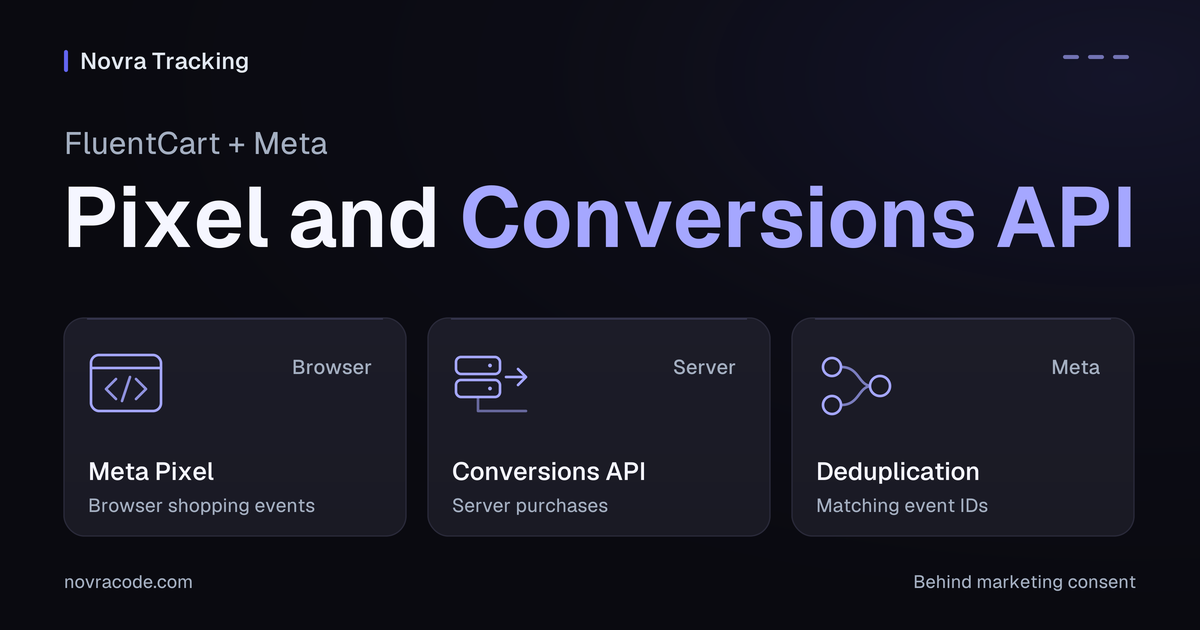
A FluentCart Facebook Pixel setup can send shopping events to Meta; Conversions API adds a separate server route. Novra Tracking supports the browser Pixel and optional server purchases for FluentCart. Connect both to the same intended Meta source, respect marketing consent and verify how corresponding purchases are paired.
Novra Tracking for FluentCart and Meta manages these connections from WordPress. The server purchase route can reduce dependence on a customer returning to the receipt page. It does not guarantee that every order will become an ad-attributed sale.
Understand the Pixel and server purchase
The Meta Pixel, still often called the Facebook Pixel, runs in the visitor’s browser. Conversions API, or CAPI, lets your website’s server send events directly to Meta. The connection method matters when checking what arrived.
| FluentCart action | Meta browser event | Important check |
|---|---|---|
| View a product | ViewContent |
The event identifies the intended product. |
| Add an item to the cart | AddToCart |
Product identifiers and quantities match the action. |
| Start checkout | InitiateCheckout |
Check the normal, modal or instant route you use. |
| Provide payment details | AddPaymentInfo |
This is a checkout step, not payment confirmation. |
| Complete an eligible paid order | Purchase |
The optional server purchase must describe the same sale. |
This guide configures server purchases. Enabling that option is not evidence that every browser event is copied server-side. Check your installed version’s documentation before adding other server event types.
Prepare the correct Meta source
- Novra’s version 1.0.0 documentation lists WordPress 6.4+, PHP 8.0+ and FluentCart 1.6+. Confirm your release’s requirements.
- Use the Meta business and web data source your shop controls. In Events Manager, identify the intended source and associated Pixel ID.
- Do not substitute a Facebook Page ID, ad account ID or catalog ID for the Pixel ID.
- List existing Meta senders from plugins, theme snippets and Google Tag Manager. Assign one integration to each event and destination.
- Prepare an isolated test store and separate Meta source, kept out of production campaign use.
Novra does not create your Meta account or campaigns. If another integration manages your product catalog, preserve that responsibility when arranging a tracking handover. This guide is not a catalog migration.
Connect the FluentCart browser Pixel
- Install Novra Tracking if needed. In WordPress, use Plugins → Add New Plugin → Upload Plugin, then install and activate the ZIP.
- Open Meta settings. Go to Novra Tracking → Settings → Platforms → Social → Meta. Enable the Pixel and enter the intended Pixel ID.
- Review shop events. Under Store → Shop & Events, review the FluentCart actions you intend to measure.
- Confirm the cookie banner. Open Privacy → Consent and check that its marketing permission reaches Novra.
- Review the dashboard. Resolve missing configuration before checking events. A ready source or high score is not proof of purchase delivery.
The Novra Tracking platform setup guide explains the connection fields. You do not need Google Tag Manager for this setup.
Keep Meta behind marketing consent
In Novra’s Basic mode, Meta waits for marketing consent. It also waits in Advanced mode. Google’s different consent behavior does not create a consent-free Meta route.
Server purchases follow the marketing choice recorded at checkout. Check acceptance and refusal without disabling consent handling. A supported cookie banner is a prerequisite, not a guarantee of legal compliance.
Add Meta Conversions API purchases
The server route needs an access token, a private credential authorizing requests to Meta. Follow Meta’s Pixel and access-token prerequisites. Use the same intended Pixel for browser and server purchases. A token belonging to another source will not establish the required pair.
- In Events Manager, select the shop’s intended data source and open Settings → Conversions API.
- Follow Meta’s manual access-token setup for that source. If the option is unavailable, have the business owner check your permissions.
- Return to Novra’s Meta section and enter the token in the Conversions API access-token field.
- Enable Send purchases from the server, then save.
- Keep the token out of page content, URLs and shared screenshots. A saved token is not evidence of a processed event.
Novra documents background delivery shortly after payment, subject to eligibility and recorded consent. Its FluentCart adapter listens for paid-order notifications separately from receipt-page visits.
FluentCart’s payment-status reference distinguishes a paid order from one that is pending, partially paid or only authorized. Novra’s new browser purchase requires a paid, non-renewal order. Do not count an unpaid receipt as a sale.
Match the purchase data and identity
Check value, currency and product identifiers against the order. Novra’s source offers order total, products after discounts and profit margin as advertising-value choices. Profit margin requires cost data; without it, the source calculation falls back to products value.
Hypothetical example: discounted products cost USD 60, with USD 6 tax and USD 5 shipping. An order-total value is USD 71. A products-only value is USD 60. Browser and server must agree on which definition they use.
Advanced matching adds selected customer information to help associate an event with a person. Hashed details become matching codes, not anonymous data. Enable only the collection your setup needs and permits. Keep personal details out of event URLs and shared examples.
Check the Meta deduplication fields
Deduplication means recognizing two reports of one action. Meta’s event-ID deduplication guidance requires matching event names and IDs at the same Pixel. Corresponding browser and server events must arrive within its documented 48-hour window.
- The browser event and server
event_nameboth describePurchase. - The browser
eventIDexactly matches the serverevent_id. - The identifier distinguishes that purchase from other purchases.
- Both copies reach the same intended Pixel ID.
Novra’s purchase-event identity uses order_ followed by the internal order ID. It is not the FluentCart invoice number used as the Google transaction identifier. Illustration only: internal order 481 produces order_481. Never copy this as a fixed event ID.
Check collisions if multiple shops or plugins feed the same Pixel. A shared value, similar source name or reused order number does not coordinate unrelated senders.
Respect the server purchase limits
Novra documents that payment must arrive within 47 hours of order creation for this server route. Its source separately checks the age of an existing browser purchase before sending the server copy. These are Novra’s safeguards, not Meta’s complete event-acceptance rules or its 48-hour receipt window for corresponding events.
A late-paid order may therefore fall outside this server path. Renewals are handled separately from new purchases. Do not assume the purchase switch provides renewal reporting or reverses an already received Meta purchase after a refund.
Verify the actual FluentCart journey
Use the isolated store, separate Meta source and payment provider’s test mode. If those controls are unavailable, postpone purchase testing. A private window alone does not keep events out of production measurement.
A test event code does not guarantee reporting isolation. Meta’s Test Events guidance says coded events are not dropped and are used for targeting and ads measurement.
- Use a customer-like session. Novra normally excludes administrators and shop managers. Check the intended marketing-consent state.
- Inspect browser actions. Open a product, add it to the cart and start checkout. Check the expected event and product data, not only a PageView.
- Check the normal paid checkout. Inspect the browser Purchase and the later server Purchase at the correct source.
- Check other checkout paths separately. Include FluentCart’s modal and instant checkout routes when you use them. A redirect payment without a receipt return is a separate server-path check.
- Inspect pairing and fields. Compare event names, IDs, currency and value. Then inspect Meta’s connection method and deduplication details.
- Check refusal and reopening. Refused marketing consent must be respected. Reopening a receipt should not produce another distinct purchase.
Meta’s setup-verification guide separates received events, deduplication and matching. Seeing two received copies does not automatically mean two counted sales.
Novra’s synthetic test-purchase tool checks a connection; it does not place a FluentCart order or exercise the complete checkout. A sent request, received event, processed purchase and ad attribution are separate outcomes. Attribution means assigning credit to an ad interaction.
Remove temporary test codes and end debugging when checks are finished. Review the intended destination before any later production rollout. Keep a short record of tested routes without customer details or tokens.
Choose the right next step
Novra Tracking fits a FluentCart store that wants supported Meta browser events and server purchases managed in WordPress. You still need the correct source, access, consent and destination-side verification.
The Novra Tracking numbers and accuracy FAQ explains why shop totals and ad-attributed sales can differ. If this approach fits your needs, review Novra Tracking’s features and plans before planning the connection.